You’ve built a chatbot. It works. Now someone asks you to build an agent — something that books flights, writes code, or negotiates a refund across three APIs. Your chatbot infrastructure collapses. Not because the model is weak, but because the stack around it was never designed for autonomy, state, or failure recovery. This is the gap that defines 2026: we have powerful models, but we don’t have the infrastructure to make them act reliably in the wild. Here’s what I’ve learned building production agents — and why you need to rethink everything.
Why Traditional LLM Infrastructure Fails for Agents
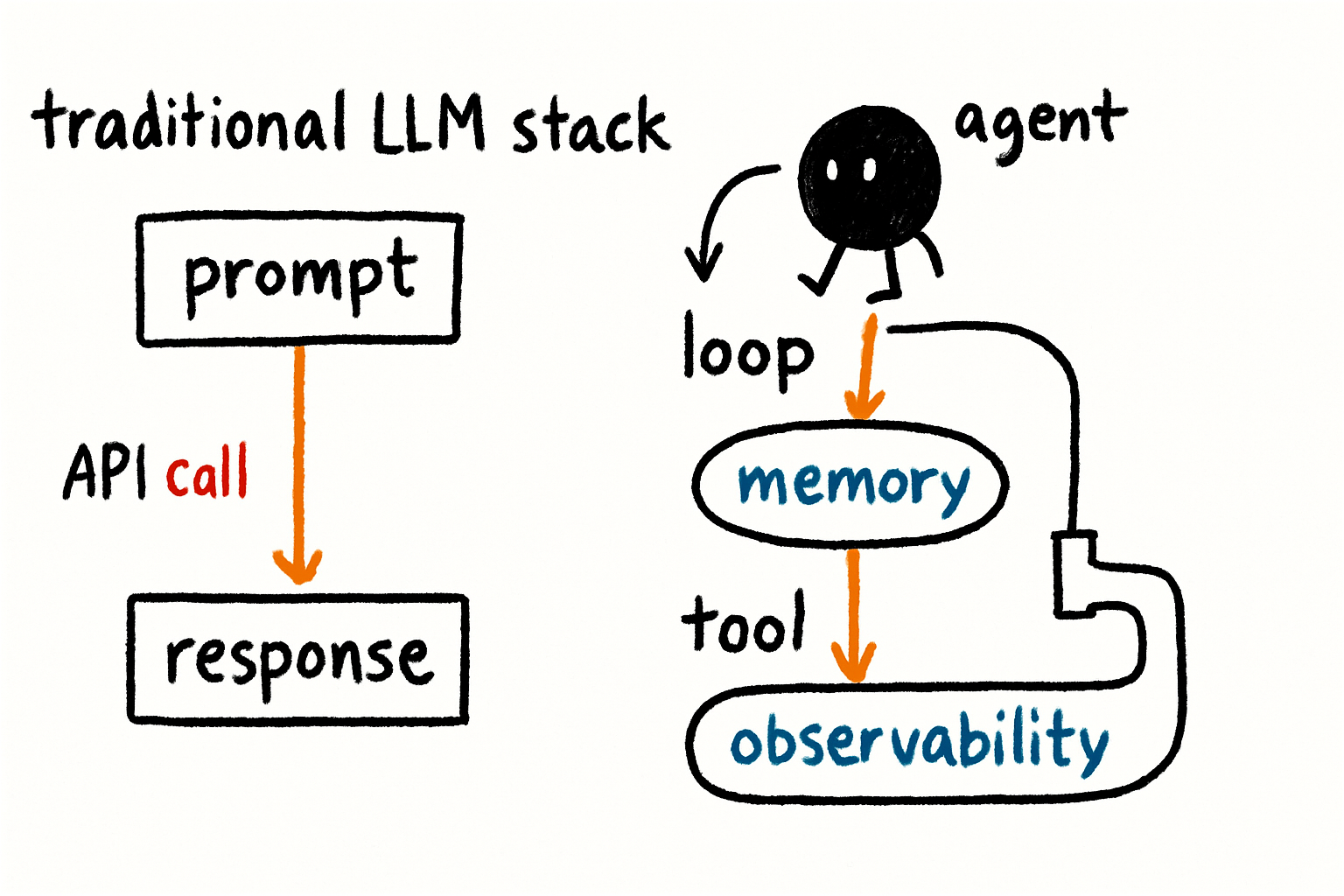
Most LLM applications today follow a request-response pattern. You send a prompt, get a completion, display it. The infrastructure is simple: a model endpoint, a prompt template, maybe a cache. But agents are not chatbots. They maintain state across multiple steps, call external tools, retry on failure, and make decisions that cascade. A single wrong tool call can delete a user’s data or book a non-refundable ticket. Traditional infrastructure gives you no guardrails for that.
The failure is structural. When an agent loops — calling the same tool repeatedly because it misinterprets the result — your stateless API gateway doesn’t help. When an agent needs to remember what it did five steps ago, your stateless prompt template can’t. When a tool returns a malformed response, your linear pipeline crashes. I’ve seen teams spend weeks debugging agent loops only to realize their logging system couldn’t capture intermediate reasoning. That’s not a model problem. That’s an infrastructure problem.
The real issue is that agents introduce non-determinism at every layer. A traditional stack assumes a fixed execution path. An agent’s path is emergent. You can’t predict which tools it will call, in what order, or how it will recover from a timeout. This means your monitoring, your error handling, and your scaling logic all need to be re-architected. The old stack was built for predictability. Agents thrive on surprise.
The Core Pillars of Agentic Infrastructure
After building and deploying several agent systems, I’ve converged on three non-negotiable pillars: stateful execution, tool governance, and dynamic orchestration. Let me walk through each.
Stateful Execution
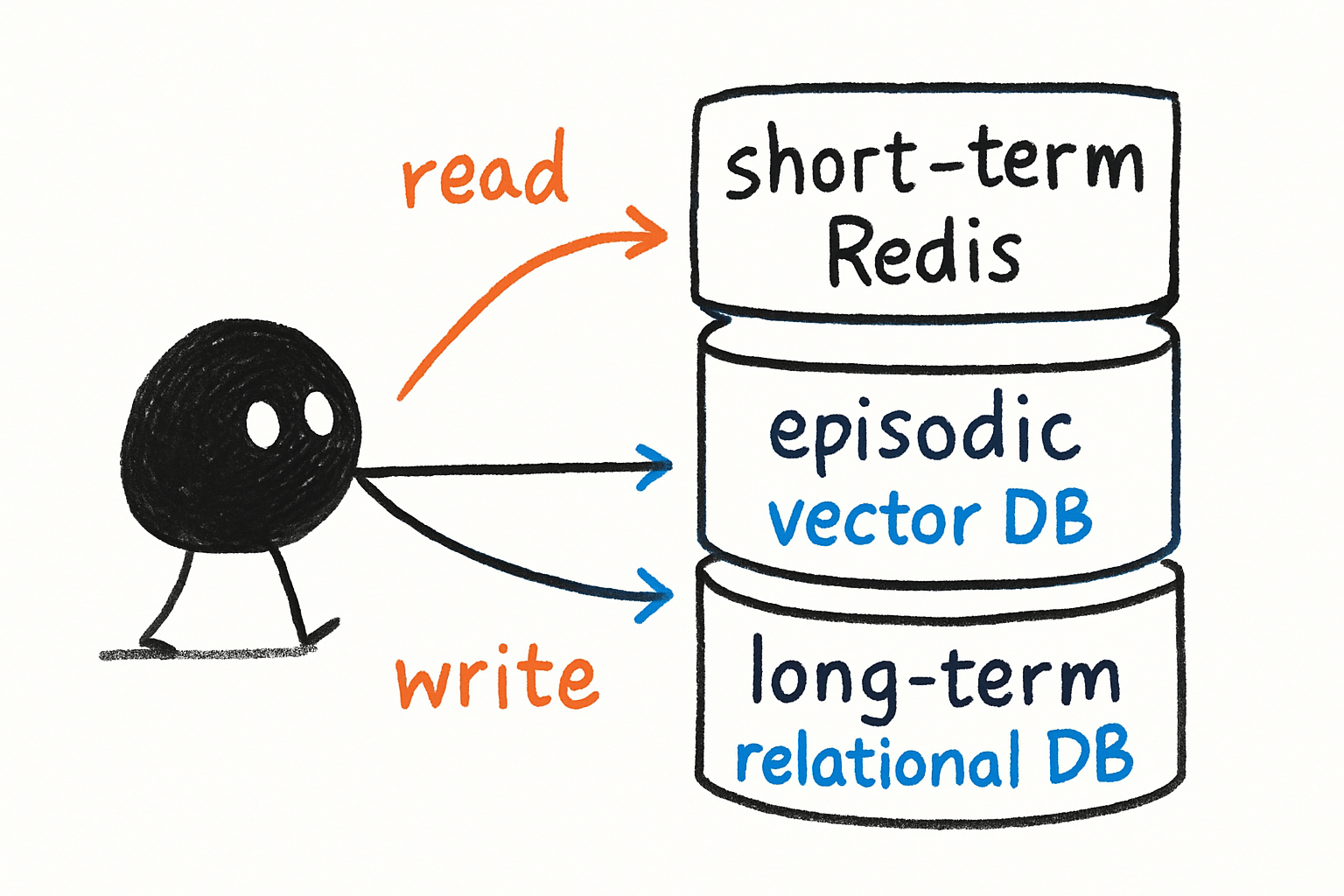
Agents need memory. Not just the prompt’s context window — persistent memory that survives crashes, spans multiple sessions, and can be queried later. This means you need a dedicated memory store, not a database you hacked into your prompt. Vector stores are one piece, but they’re not enough. You also need key-value stores for short-term session state, and relational stores for long-term user preferences.
My take: Most teams over-engineer memory. Start with a simple Redis-backed session store and a vector store for episodic memory. You can always add graph databases later. The bottleneck is never memory capacity — it’s the latency of retrieval during an agent loop. Keep it fast, not fancy.
Tool Governance
Tools are the agent’s hands. But every tool is a risk. A poorly described tool can be called with wrong parameters. A tool that mutates state can be called twice. A tool that returns sensitive data can leak it. You need a tool registry that enforces contracts: input schemas, output schemas, rate limits, and idempotency keys.
I use a pattern where each tool is defined as a typed function with a manifest — name, description, parameters, return type, and a safety classifier. The agent can only call tools that match its permission scope. This is not optional. Without it, your agent will eventually call the “delete_user” tool because it thought “user” meant “session.”
Dynamic Orchestration
Static DAGs (directed acyclic graphs) work for pipelines. Agents need dynamic orchestration — the ability to choose the next step based on current state. This is where frameworks like LangGraph, CrewAI, and custom state machines come in. But frameworks are not infrastructure. They are abstractions. The real infrastructure is the execution engine that can pause, resume, fork, and rollback agent runs.
My take: Don’t use a framework that hides the state machine. You need to see every transition, every tool call, every decision point. If your framework abstracts away the loop, you can’t debug it. I prefer explicit state machines with event sourcing — every agent action is an event you can replay.
Orchestration, Memory, and Tool Integration
The three pillars don’t live in isolation. They interact in ways that create failure modes you haven’t imagined. Here’s what I’ve learned about making them work together.
Orchestration Patterns
The most common pattern is the supervisor — one agent delegates subtasks to specialist agents. This works well for complex workflows like code generation or multi-step research. But the supervisor becomes a bottleneck. If it misinterprets a subtask result, the whole chain fails. A better pattern is the router — a lightweight classifier that picks the next agent based on input, not a full LLM call. Routers are faster, cheaper, and easier to debug.
Another pattern is parallel execution — multiple agents work independently and merge results. This is great for data collection or validation. But you need a merge strategy that handles conflicts. If two agents disagree, who wins? I’ve seen teams hardcode a priority list, but that breaks when agents are dynamic. Better to use a consensus mechanism — a third agent that reconciles differences.
Memory Integration
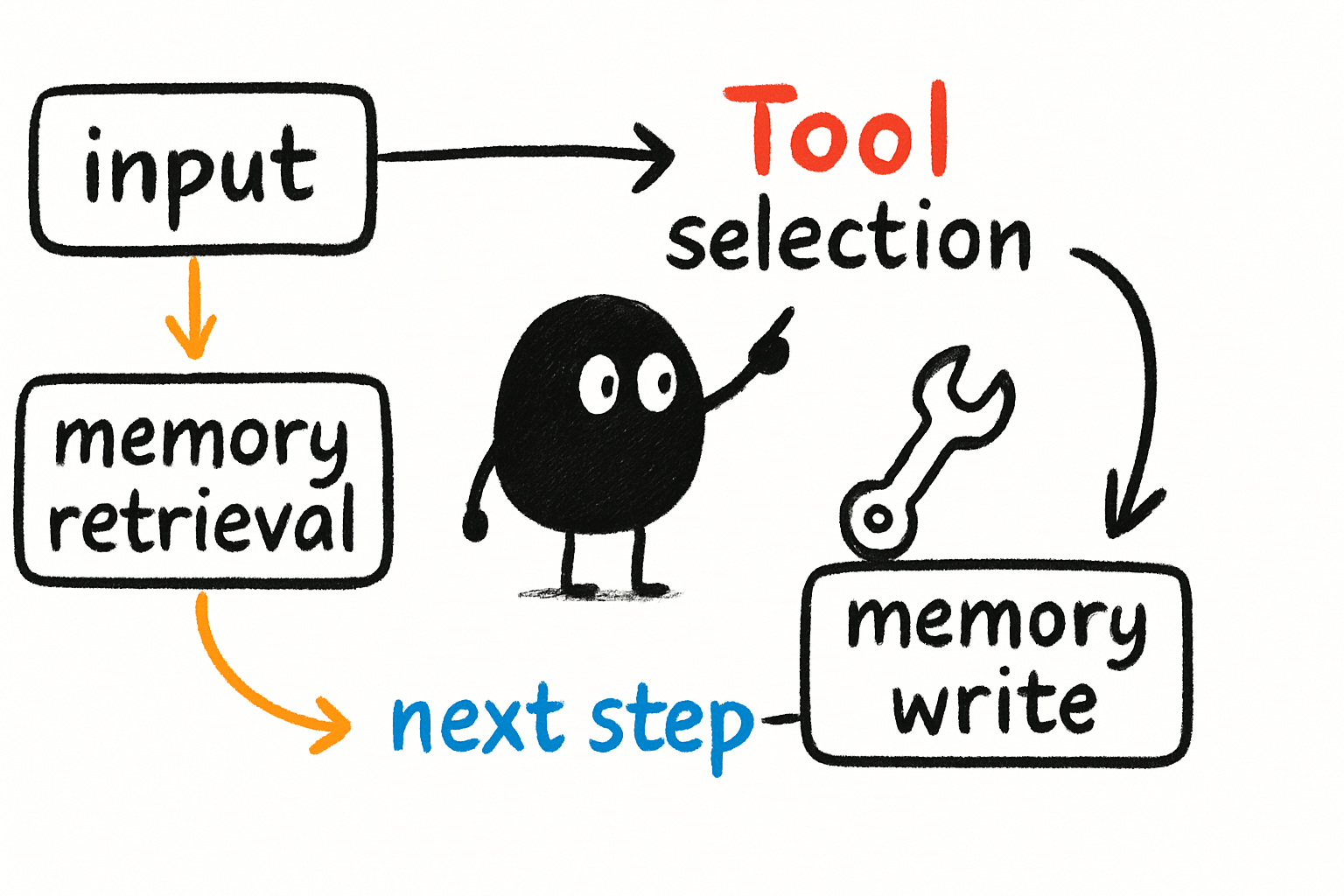
Memory must be integrated into the orchestration loop, not bolted on. Every time an agent makes a decision, it should write to memory. Every time it starts a new step, it should read relevant memory. The key is relevance — you don’t want to dump the entire history into the prompt. Use retrieval-augmented generation (RAG) but tuned for agent context. I’ve found that a hybrid approach — vector similarity for episodic memory, key-value for session state, and a small recency buffer — works best.
What about tool integration? Tools should be able to read and write memory too. If a tool fetches a user’s booking history, it should store that in memory so the agent doesn’t call it again. This reduces latency and cost. But it also introduces stale data. You need a cache invalidation strategy — set TTLs on memory entries, and let tools override them when new data arrives.
Observability and Debugging in Agent Systems
This is where most teams fail. You can’t debug an agent by reading logs. Agents produce non-linear execution paths — one run might call five tools, another might call twenty. Traditional logging gives you a flat list of events. You need trace-based observability that captures the entire execution tree: every decision, every tool call, every memory read, every retry.
The Debugging Nightmare
Imagine an agent that’s supposed to book a flight. It calls the search tool, gets results, calls the book tool, and fails. You look at the logs and see “Tool call failed: invalid input.” But why? Was the input malformed? Was it a timeout? Did the agent misinterpret the search results? With traditional logging, you have to reconstruct the state manually. With trace-based observability, you can replay the entire agent run step by step, inspect the state at each decision point, and see exactly what the agent was thinking.
I use OpenTelemetry for traces, but I extend it with agent-specific spans: “decision”, “tool_call”, “memory_retrieval”, “error_recovery”. Each span carries the full context — the prompt, the model’s output, the tool’s response. This makes debugging a matter of clicking through a trace, not grepping logs.
Key Metrics for Agent Systems
- Step count: How many steps does an agent take to complete a task? High variance indicates instability.
- Retry rate: How often does a tool call fail? This catches API issues or bad tool descriptions.
- Loop detection: How often does the agent repeat the same tool call with the same input? This is a sign of confusion.
- Decision latency: How long does the model take to choose the next step? This affects user experience.
My take: If you can’t replay an agent run, you can’t fix it. Invest in trace-based observability from day one. It’s not a nice-to-have — it’s the difference between shipping and firefighting.
Practical Recommendations for Your Next Agent Project
Start small. Don’t build the agent that does everything. Build one that does one thing well — like “fetch customer support tickets and classify them.” Then add tools. Then add memory. Then add orchestration. Each layer introduces complexity, and you need to validate each one before moving on.
Choose your model carefully. Not all models are good at tool calling. I’ve benchmarked several on LiveBench and found that some models hallucinate tool names or ignore schemas. Test your model on a set of tool-calling tasks before committing. The Vellum leaderboard is a good starting point, but run your own tests — your tools are unique.
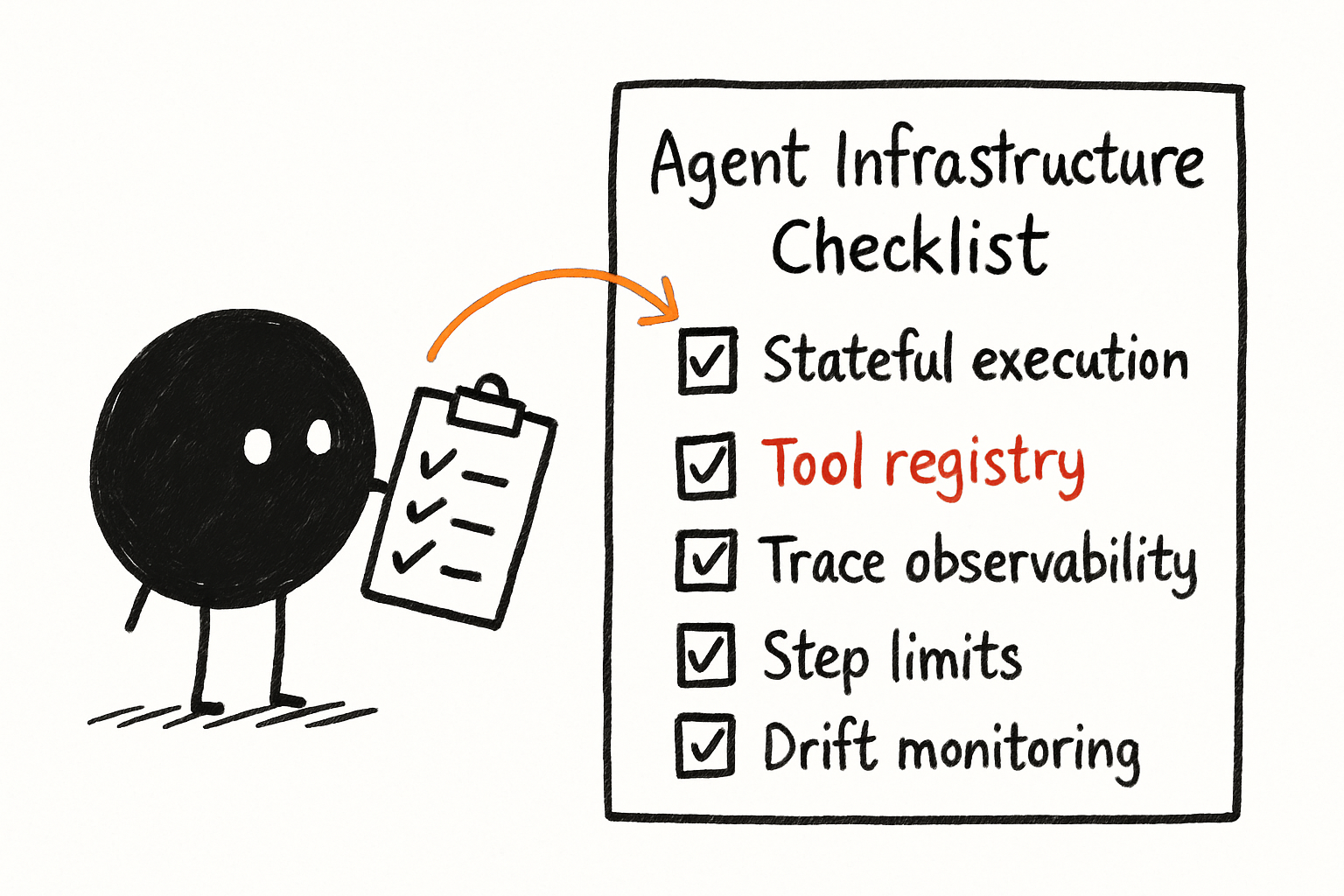
Use a tool registry, not a list. A registry enforces contracts, rate limits, and security. It’s a single source of truth for what the agent can do. Without it, you’ll end up with tools scattered across code, documentation, and the agent’s prompt. That’s a disaster waiting to happen.
Plan for failure. Agents will fail. They will call the wrong tool, loop infinitely, or produce garbage. Build retry logic with exponential backoff, circuit breakers, and human-in-the-loop fallbacks. If an agent fails three times, escalate to a human. Don’t let it retry forever.
Monitor for drift. Models change. APIs change. Your agent’s behavior will drift over time. Set up automated tests that run your agent against a fixed set of tasks and compare results. If accuracy drops, you’ll know before your users do.
What is the most common mistake teams make when building agent infrastructure? They treat agents like chatbots. They use the same API gateway, the same logging, the same state management. Agents need dedicated infrastructure — stateful execution, tool governance, and trace-based observability. Without it, you’re building a house on sand.
How do you handle agent loops that waste tokens? Set a maximum step limit per task. If the agent exceeds it, force a restart or escalate. Also, implement loop detection — if the agent calls the same tool with the same input twice, pause and ask if it’s stuck. This saves tokens and prevents infinite loops.
Key takeaways
- Traditional LLM infrastructure (stateless APIs, linear pipelines) breaks for agents because agents are non-deterministic and stateful.
- Three pillars of agentic infrastructure: stateful execution, tool governance, and dynamic orchestration.
- Memory must be integrated into the orchestration loop, not bolted on. Use a hybrid approach: vector, key-value, and recency buffer.
- Observability requires trace-based systems (OpenTelemetry with agent-specific spans) to replay and debug non-linear execution.
- Start small, choose models that are good at tool calling (test on LiveBench), and plan for failure with retries and human-in-the-loop.
- Monitor for drift — models and APIs change, and your agent’s behavior will degrade without automated testing.
The infrastructure gap between chatbots and agents is real, but it’s also solvable. You don’t need a massive team or a custom data center. You need the right primitives — state, tools, and traces — wired together with intention. Build that, and your agents will work. Skip it, and you’ll be debugging loops at 2 AM.
Written by Uddit, an AI engineer working on AI engineering, looping, agentic infrastructures, and context engineering. Connect on LinkedIn.